
Share an order or customer with your team
Every Order Manager can already view every order and customer in your organization. Sharing lets them edit it too. Share a quote when a colleague needs to finish or submit it for you, and a customer when colleagues need to create orders for them.
You can share an order or customer you created, with the limits for designers noted below. Only an admin can share one someone else created, and only an admin can make a shared one private again.
Share an order
Section titled “Share an order”You can share an order while it’s a Quote. If you’re a designer, you can share your quotes only if your manufacturer allows it: an Order Manager turns this on in the order settings, under Designer team-editable orders. Until they do, there’s no Share with team button.
- Open the order.
- Select Share with team at the top of the page.
- In Share order with team?, select Share with team.
A handshake icon (Team-editable) appears next to the order’s status, and the Share with team button goes away.
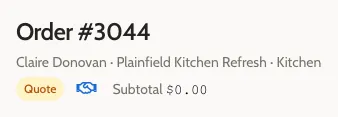
Other Order Managers can now edit the order’s line items, presets, details, and design, and submit it. Other designers still can’t see it. You’re still its submitter. If you’re an Order Manager, other Order Managers can also accept the shared order once it’s priced. See Permissions.
Sharing an order doesn’t share its customer. For colleagues to duplicate the order, its linked customer, if it has one, has to be shared too.
Share a customer
Section titled “Share a customer”This is for Order Managers. Designers can’t share customers themselves; ask an admin if one of yours needs sharing.
- Open the customer’s page.
- Select Share with team at the top of the page.
- In Share customer with team?, select Share with team.
The page shows Team-editable under the customer’s name.
Other Order Managers can now edit the customer, their projects, and their areas, and create orders for them. Sharing a customer doesn’t share their orders.
Share when you create it
Section titled “Share when you create it”- Order Managers: Add Customer and Create Order both have a Share with team checkbox, checked by default. Leave it checked to share the new customer or order straight away.
- Designers: Create Order has the checkbox only if your manufacturer allows designers to share quotes. It’s checked by default, and its note reads “Any Order Manager in this org can edit. Once enabled, sharing can’t be turned off.” Add Customer never has it.
A quote made from a design isn’t shared. Share it afterwards if colleagues need to edit it.
If you can’t edit a colleague’s quote
Section titled “If you can’t edit a colleague’s quote”This is for Order Managers. (Designers don’t see each other’s quotes at all.)
A quote someone else created stays read-only for you until it’s shared. The Design tab, for example, says “You can’t create a design unless it’s shared with your team.” Ask the person who created it to share it, or ask an admin.
Once an order is submitted, any Order Manager can price and process it whether it’s shared or not, and sharing doesn’t unlock its line items or presets. See Change an order after submission.
Related
Section titled “Related”- Permissions lists exactly what sharing allows.
- Seeing, editing, and sharing explains how ownership and sharing fit together.